After a half year of enjoying the TS100 soldering iron, it was time to upgrade the firmware with the open source one from miniware.

Now i have a better temperature control and a great menu. Good work guys!

After a half year of enjoying the TS100 soldering iron, it was time to upgrade the firmware with the open source one from miniware.
Now i have a better temperature control and a great menu. Good work guys!
Quickly want to change directory to your favorite project folder?

I found this article of Scott Hanselman explaining this great tool:
https://www.hanselman.com/blog/JumpLocationAChangeDirectoryCDPowerShellCommandThatReadsYourMind.aspx
I wanted to see the current branch in my powershell prompt, so i installed posh-git
https://github.com/dahlbyk/posh-git

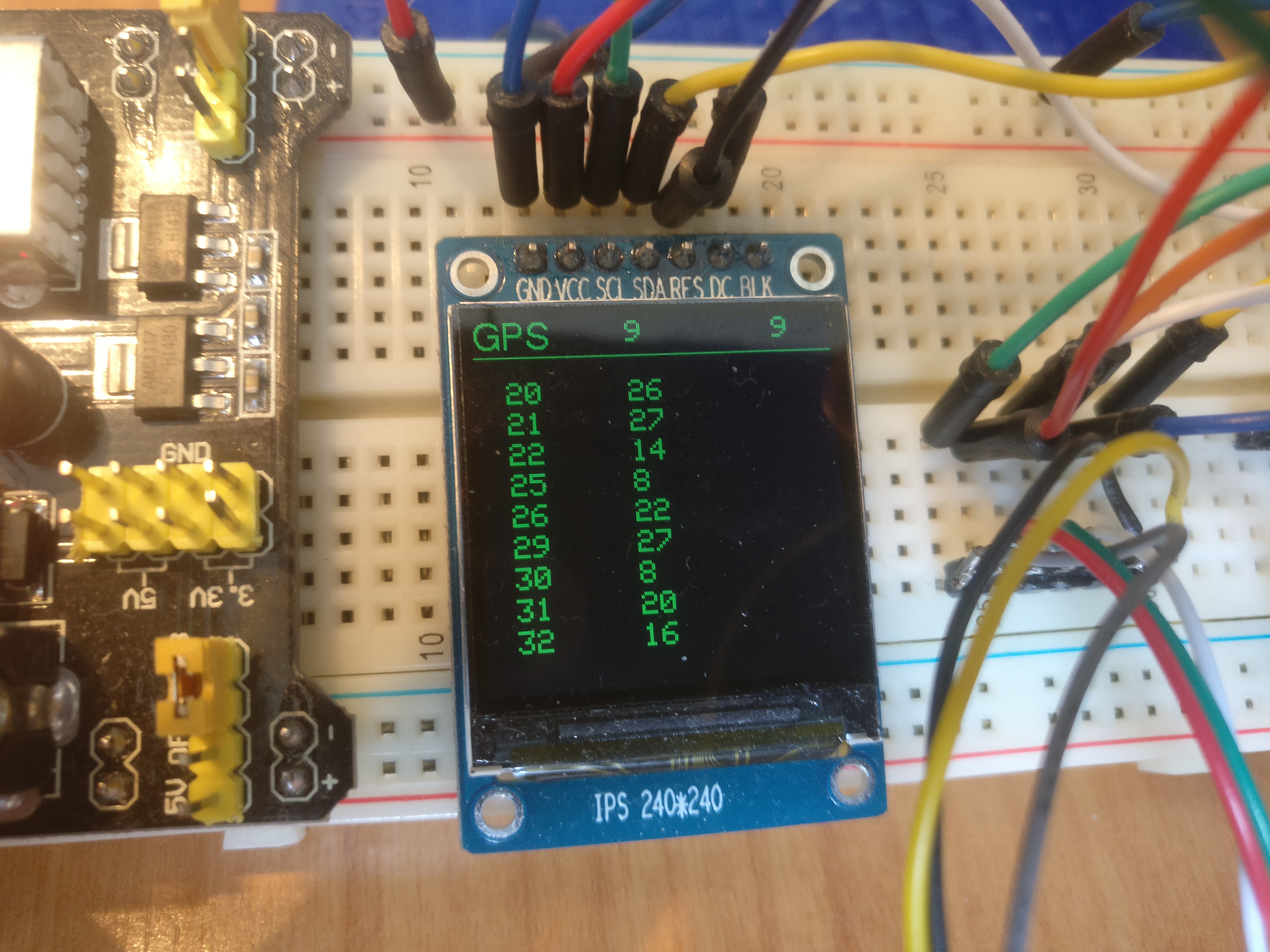
Using the combination of a ESP32, nRF24L01+, fullcolor OLED display and a GPS module to create a low cost wireless tracking system.

Tracker screen.
The blue circle is a team member.

Players screen (for debugging).
Up to 10 players can be tracked.

GPS screen
Show satellites used for positioning with their SNR

Vandaag een presentatie gegeven aan collega’s over GraphQL. Dit is een interessante technologie om allerlei web (micro) services te ontsluiten via 1 API. Daarbij kan in het request bericht precies aangegeven worden welke objecten en velden in de reponse moeten zitten. Ideaal dus voor een applicatie waarbij er meerdere front-end’s zijn, zoals een website, mobiel of tv die iedere hun eigen beperkingen van data weergave hebben.
Meer info https://graphql.org/
To check the functioning of the Solesta solar water heater, i have used a arduino Wemos D1 with 4 Dallas ds18 temp sensors. Using the blink app and the blink cloud interface a temp logger is created within a couples of hours.
Here you see the all the temperatures over a day in action.
The solesta is switching of the pump to the collector if the water in the boiler is hot enough, so this explains the wave patern.

Created a scoreboard in powerpoint for a “minute to win it” party game.

Gisteren heb ik de MicroView op kickstarter geplegded. Deze campagne loopt nog tot 17 april, dus wees er snel bij als je nog wilt bestellen.
Wat is de MicroView?
Het is een chip-size arduino met ingebouwd OLED Display met een resolutie van 64×48. Ideaal voor expirementen op bv een breadboard omdat je meteen meet resultaten kunt weergeven op het scherm (zie voorbeeld hieronder).

Er zijn 6 analoge ingangen en 12 digitale ingangen beschikbaar, waarvan 3 met PWM (Pulse-Width-Modulation).
Er zit een apparte bibiotheek/lib bij voor de scherm weergave. Hiermee kun je gemakkelijk waarden weergeven op het scherm.

Het lijkt een ideaal arduino start pakket voor gebruik in ‘t ICT onderwijs.
Zodra hij binnen is komen we met terug met een uitgebreide review.
sometimes you need to import a large script into mysql without any other access then PhpMyAdmin
http://www.ozerov.de/bigdump/ comes to the resque
I could successfully import a script >400MB


Today we received some HC05 bluetooth serial modules from asia. It’s a very cheap solution to enable bluetooth on your device, it can be found on ebay for around $1. It’s Bluetooth v2.0 compatible and requires almost no components to connect to an arduino or raspberry pi.
Setting up a connection with another device (smartphone) is very easy. only 4 wires and 2 resistors (for voltage level correction) are required to connect it with an arduino.
CSR BC417143B datasheet


AT Commands used by HC-05 & HC-06 and most of other Bluetooth Devices
COMMAND FUNCTION
1 AT 			Test UART Connection
2 AT+RESET 		Reset Device
3 AT+VERSION 		Querry firmware version
4 AT+ORGL 		Restore settings to Factory Defaults
5 AT+ADDR 		Query Device Bluetooth Address
6 AT+NAME 		Query/Set Device Name
7 AT+RNAME 		Query Remote Bluetooth Device’s Name
8 AT+ROLE 		Query/Set Device Role
9 AT+CLASS 		Query/Set Class of Device CoD
10 AT+IAC 		Query/Set Inquire Access Code
11 AT+INQM 		Query/Set  Inquire Access Mode
12 AT+PSWD 		Query/Set Pairing Passkey
13 AT+UART 		Query/Set UART parameter
14 AT+CMODE 		Query/Set Connection Mode
15 AT+BIND 		Query/Set Binding Bluetooth Address
16 AT+POLAR 		Query/Set LED Output Polarity
17 AT+PIO 		Set/Reset a User I/O pin
18 AT+MPIO 		Set/Reset multiple User I/O pin
19 AT+MPIO? 		Query User I/O pin
20 AT+IPSCAN 		Query/Set Scanning Parameters
21 AT+SNIFF 		Query/Set SNIFF Energy Savings Parameters
22 AT+SENM 		Query/Set Security & Encryption Modes
23 AT+RMSAD 		Delete Authenticated Device from List
24 AT+FSAD 		Find Device from Authenticated Device List
25 AT+ADCN 		Query Total Number of Device from Authenticated Device List
26 AT+MRAD 		Query Most Recently Used Authenticated Device
27 AT+STATE 		Query Current Status of the Device
28 AT+INIT 		Initialize SPP Profile
29 AT+INQ 		Query Nearby Discoverable Devices
30 AT+INQC 		Cancel Search for Discoverable Devices
31 AT+PAIR 		Device Pairing
32 AT+LINK 		Connect to a Remote Device
33 AT+DISC 		Disconnect from a Remote Device
34 AT+ENSNIFF 		Enter Energy Saving mode
35 AT+EXSNIFF 		Exit Energy Saving mode
more info: